
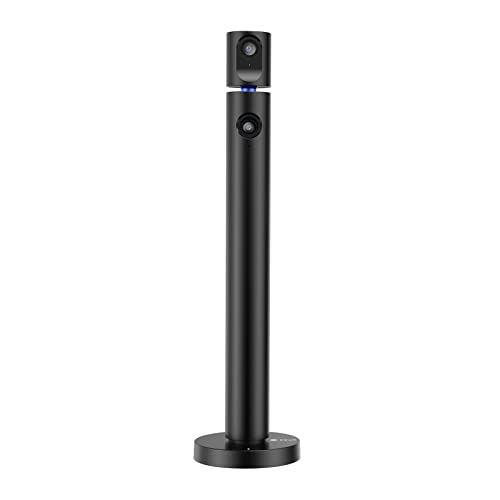
The Halo X Pro is a USB webcam with two 1080p cameras on one base. Each camera can point in its own direction, so a single device can show your face and, at the same time, your desk, a whiteboard or the person across the table. This page covers the black model sold as the CZUR Halo X Pro Dual Webcam for PC, 1080P Web Camera with Microphone.
Specs
- Cameras: two, both 1920 × 1080
- Frame rate: main camera 60 fps, second camera 30 fps
- Field of view: 90° per camera
- Rotation: top camera turns 270° horizontally by hand; the base turns 180°
- Lens: fixed-focus prime lens, 3.55 mm focal length
- Sensor: CMOS
- Stills: 2 MP, 16:9, auto white balance
- Audio: built-in microphone
- Connection: USB, no driver to install
- Systems: Windows and macOS
- Size: 5.08 × 14.25 × 5.08 in
- Color: black
What two cameras change
A normal webcam gives you one view, so showing anything else means tilting the camera, holding the object up to it or adding a second camera with its own cable. The Halo X Pro builds the second view into the same base. Because the top camera turns 270° and the base turns 180°, you can set the two angles separately: one on you, one on a notebook, a product or the room.
Some uses this suits:
- Tutoring and teaching: your face on one camera, worked examples on paper on the other
- Product demos and crafts: a close view of your hands next to a view of you talking
- Interviews and two-person calls: each camera pointed at one person across a table
- Streaming: a face cam and a desk cam from one USB connection
The software question
This is the one thing to understand before you buy. Many video apps can only use one camera at a time, and CZUR says some software may not be able to run both Halo cameras together. For the dual view, CZUR points you to its own app, CZUR Camera. In a normal call you'll pick one of the two cameras in the app's video settings, or run both through CZUR Camera. Streamers who already use OBS can bring each camera in as a separate source.
Image and frame rate
The main camera records 1080p at 60 fps, which keeps motion smooth. The second camera runs at 30 fps, which is enough for a document, a desk or a slower subject. Both are fixed focus, so there is no autofocus hunting, but very close objects may not be sharp. CZUR also warns that the picture can look soft if the lens is dirty and suggests cleaning fingerprints and grease off with an optical lens wipe. If the image ever looks hazy, clean the lens first.
Setup and compatibility
The Halo X Pro is plug and play over USB on Windows and Mac. Apps named as working with it include Zoom, FaceTime, OBS, Hangouts, Twitch, YouTube and GoReact. Because it needs no driver, it is easy to move between a laptop at home and a classroom PC.
Good fit
- Teachers, tutors and presenters who regularly show paper or objects
- Creators who want a second angle without a second camera
- Small rooms where two people share one call
Think twice if
- You only ever need your face on screen; a single-camera webcam is simpler
- Your call app is the only software you can run, since dual view depends on CZUR Camera or a tool like OBS
- You need autofocus for very close detail work