
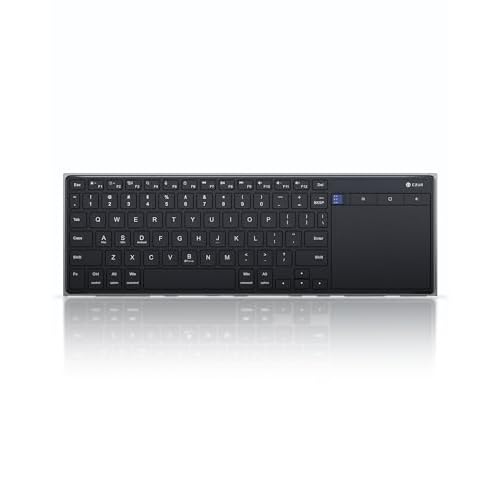
Two buying options. The K5S is sold as two separate items, and they share a product name, a feature list and the same connection: Bluetooth and wired USB.
- Version 1 · 78-key, Bluetooth + wired: size S, black. This page describes Version 1.
- Version 2 · 81-key, Bluetooth + wired: sold separately.
The published difference is the key count: Version 1's spec table gives 78 keys and Version 2's gives 81. Version 1's table also lists its size, color and case material, which Version 2's table doesn't.
Version 1 specs
- Product name: CZUR K5S Bluetooth Keyboard with Touchpad, Wireless & Wired Keyboard
- Variant: size S, black
- Keys: 78
- Connection: Bluetooth wireless or wired USB, switchable
- Systems: Windows, macOS and iOS, and Android, with a shortcut for each
- Power: rechargeable battery, charging cable in the box
- Size: 13.2 × 4.3 × 0.3 in
- Case: ABS plastic
- Backlight: none
Version 1 and Version 2 compared
| Version 1 | Version 2 | |
|---|---|---|
| Label | Version 1 · 78-key, Bluetooth + wired | Version 2 · 81-key, Bluetooth + wired |
| Key count | 78 | 81 |
| Connection | Bluetooth + wired USB | Bluetooth + wired USB |
| Size in spec table | 13.2 × 4.3 × 0.3 in | not published |
| Color and case in spec table | black, ABS | not published |
| Feature list | same five features | same five features |
Apart from the key count, the two pages describe the same keyboard: the same touchpad, Fn shortcuts, rechargeable battery, sleep behavior and no backlight. If you want the fewer-key layout with a published size and color, choose Version 1. If you want the 81-key layout, choose Version 2. Check the photos on each product page if the exact key layout matters to you.
Why a compact layout
A slim keyboard with a trackpad beside the keys has limited width, so the K5S skips a number pad. CZUR also notes the keycaps are slightly smaller than on a full-size keyboard. Touch typists coming from a full-size board should expect a few days to get used to the spacing. In return, Version 1 is 13.2 inches long and 0.3 inches thick, which fits in a laptop sleeve or a tablet bag.
Two ways to connect
Use Bluetooth to pair with a laptop, tablet or phone and sit wherever is comfortable. Use the USB cable at a desktop that has no Bluetooth, or on a work machine where wireless devices are restricted. You can switch between the two modes, so one keyboard can serve a wired PC and a wireless tablet.
The touchpad as your mouse
The touchpad next to the keys means one device handles typing and pointing. That is the main reason to choose the K5S over a normal keyboard. It suits a sofa setup with a PC on the TV, a tablet on a stand, or a narrow desk with no room for a mouse. One detail to know: the touchpad does not wake the keyboard from sleep. Press a key first.
Switching systems
The K5S remaps its keys for the device you're using:
- Fn + A: Mac and iOS
- Fn + S: Windows
- Fn + D: Android
The modifier keys then land where each system expects them.
Battery and sleep
The battery is rechargeable and the cable comes in the box, so there are no disposable cells to replace. After 10 minutes without use the keyboard goes to sleep, and any key wakes it. The lack of a backlight also saves charge, at the cost of typing in the dark.
Good fit
- Travelers who want a light keyboard and pointer in one piece
- A living-room PC or media box controlled from the sofa
- Desks that switch between a wired computer and a wireless tablet or phone
Think twice if
- You type in low light, since there is no backlight
- You rely on a number pad or full-size keycaps
- You do detailed mouse work all day and would miss a real mouse
·