
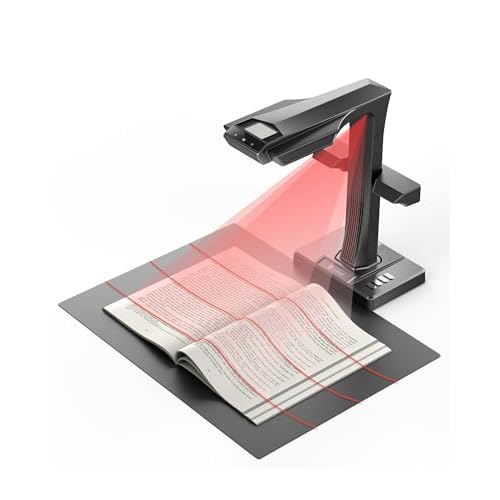
Verdict: The ET MAX is the scanner in the CZUR lineup for people whose paper is bound. CZUR lists a 38MP sensor, about 410 dpi by default, flat pages up to A3, bound books up to A4 per page and reference thickness of up to 50 mm at A4. Add curve flattening, side lights, a foot pedal and HDMI output, and you get a single desk unit that handles textbooks, ledgers, magazines and loose documents. It costs several times more than the smaller CZUR models, so it makes the most sense if books are a regular part of your scanning.
Key specs
- Sensor: 38MP CMOS, 7168 × 5376 pixels
- Default resolution: about 410 dpi
- Scan area: flat single pages up to A3 (420 × 297 mm); bound books up to A4 per page
- Reference thickness: 35 mm at A3, 50 mm at A4
- Stated speed: about 1.5 seconds per flat page; about 1.5 seconds per two-page book spread
- Exports: JPG, PDF, searchable PDF, Word, Excel and TIFF (converted from JPG)
- Text recognition: 180+ languages
- Lighting: top LED plus side lights
- Controls: button on the device, software trigger, hand button and foot pedal
- Connections: USB 2.0; HDMI output for presenting
- Systems: Windows XP/7 or later, macOS 13 or later on Apple Silicon and 12 or later on Intel Macs, and Ubuntu 20.04 to 24.04 (Linux: Ubuntu only)
What stands out
Book thickness. The headline number is 50 mm of book at A4 page size. CZUR's own model comparison puts the ET range well ahead of flat-page models that only take single sheets. That covers most hardcover textbooks and reference volumes without having to force them open.
Curve flattening. Three laser lines trace the curve of an open book, and the software uses that line to flatten the page and straighten the text. It also splits a spread into two pages and can erase fingertips that appear at the margins while you hold the book. This is what lets you scan a book without pressing it against glass.
Resolution headroom. At 38MP, the ET MAX has the most pixels in the CZUR scanners covered on this site. Because a camera-based scanner spreads its pixels across the scan area, more pixels mean more detail on large pages. CZUR's quoted 410 dpi default is the highest of the four.
Hands-free scanning. Between the foot pedal, the hand button and auto-scan on page turn, you can keep both hands on the book. For long projects, that matters more than the per-page speed.
Presenter mode. HDMI output lets the ET MAX act as a document camera on a monitor or projector without a computer in between, according to CZUR's spec sheet. For classrooms and meetings, that's a useful second job.
What to watch
The ET MAX is a large desk unit, and the published specs don't make it a portable choice. If your books are mostly thin, the Aura Pro covers similar ground in a foldable unit.
Bound-book support stops at A4 per page. Oversized atlases or large-format art books may need to be scanned in sections. CZUR's sources differ slightly on export formats (some list PNG and BMP as well), so treat the list above as the core set.
As with all camera-based scanners, the effective dpi on a full A3 sheet is lower than the default figure suggests for smaller pages, and lighting in the room can affect results. CZUR includes side lights to help with glare on glossy paper.
Who it's for
- Students, researchers and libraries digitizing textbooks, theses or bound archives
- Family historians working through albums, ledgers and diaries
- Offices that scan a mix of bound reports and A3 drawings
- Teachers who want a document camera with HDMI output
It's less suited to anyone who mainly scans loose single sheets in bulk. A sheet-fed scanner will be faster for that work.
How it compares
Within CZUR's range, the Aura Pro is the lighter book scanner, with a 14MP sensor, and it folds away.
The ET family also includes lower-resolution members (ET16 Plus, ET18 Pro and ET24 Pro) that share the ET thickness class. CZUR positions the ET MAX as the highest-resolution model of the family.
Outside CZUR, the ScanSnap SV600 is the best-known overhead alternative. It lists up to 30 mm of thickness and about 3 seconds per page. Our CZUR vs ScanSnap SV600 comparison goes through the differences, and the CZUR review covers the whole lineup.
Setup tips
Place the scanner on a flat, stable surface, with the supplied black mat underneath, and keep strong side light (such as a window) to a minimum to avoid glare. Use the foot pedal for long books, and turn on auto-scan once you're comfortable with the page-turn rhythm. Run text recognition after the capture session rather than page by page to keep the session moving.
FAQs
What's the largest book the ET MAX can scan? CZUR lists bound books up to A4 per page and up to 50 mm thick at that size. At A3, the reference thickness is 35 mm.
Does it work on a Mac? Yes. CZUR lists macOS 13 or later on Apple Silicon and 12 or later on Intel Macs, plus Windows XP/7 or later and Ubuntu 20.04 to 24.04.
Can it make searchable PDFs? Yes. Exports include searchable PDF, Word and Excel, with text recognition in 180+ languages.
Can I use it as a document camera? CZUR lists a PC visual presenter mode and HDMI output, so it can show a live image on a screen.
Is it fast? CZUR quotes about 1.5 seconds per flat page and about 1.5 seconds per two-page book spread. Real speed depends on how quickly you turn pages.