
Book Scanner vs Flatbed Scanner
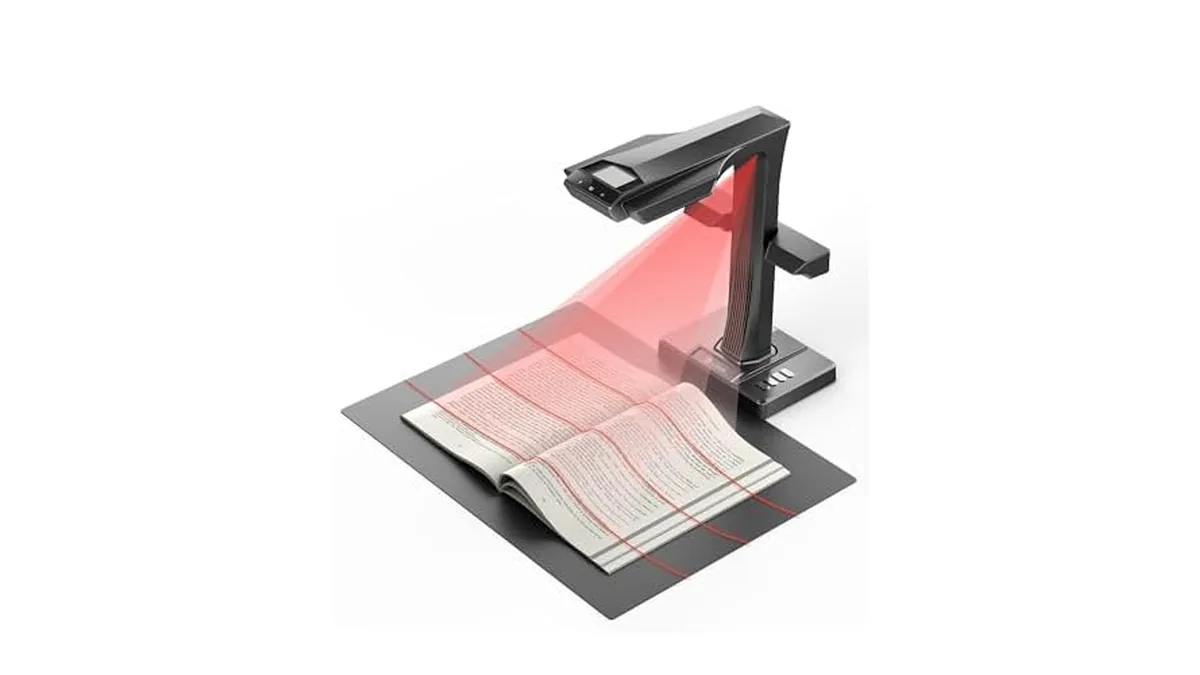
A flatbed scanner wants the page pressed flat against glass. A book scanner looks down at an open book from above. If you scan a few loose sheets a month, a flatbed is fine. If you scan bound books, or a lot of pages, an overhead book scanner saves time and spines.
How does each one capture a page?
A flatbed moves a sensor under a glass plate, reading the page line by line. The page has to lie face down on the glass, and a lid presses it flat.
An overhead book scanner, like CZUR's, is a camera on an arm. The book lies open, face up, and the camera photographs the spread in one shot. On the Aura Pro and ET MAX, three laser lines trace how the pages curve toward the spine, and the software flattens the image and splits it into two pages.
What happens to the book?
To get a clean flatbed scan of a bound book, you press it face down and push on the spine so the gutter touches the glass. Do that for every page of a hardcover and the binding suffers. Old or fragile books are at real risk.
An overhead scanner never presses the book. You turn pages as if you were reading. That's the main reason libraries and family historians prefer overhead scanning.
Which is faster on a whole book?
Overhead, by a long way. CZUR lists about 1.5 seconds per two-page spread on the ET MAX and about 2 seconds on the Aura Pro. With a foot pedal or auto-scan on page turn, your hands stay on the book. A flatbed needs you to lift the lid, flip the book, line it up and wait for the pass, every time.
What about loose paper?
Here a flatbed holds its own for occasional use. For a pile of loose pages, though, overhead scanners are quick too: the Lens800 Pro captures in a second or less and can trigger automatically when you swap the page.
Page size?
Most home flatbeds stop at letter or A4. Several CZUR models reach A3: the Shine800A3 Pro for flat sheets, and the ET MAX for flat sheets up to A3 and books up to A4 per page.
Image quality?
A flatbed's lid and glass give even light and a flat page, which is excellent for photos. An overhead camera depends on its light and on flattening. CZUR handles that with side lights on the ET MAX and the Aura Pro, plus software flattening. For detailed archiving, the ET MAX's 38MP sensor at about 410 dpi is the one to look at. Our dpi explainer goes deeper.
The short version
Go with a flatbed if you: - scan a handful of loose pages and photos - never scan bound books
Go with an overhead book scanner if you: - scan books, notebooks or bound reports - care about the bindings - have hundreds of pages to get through - need A3
The CZUR book models are side by side in Book Scanners, and the CZUR review covers the full range.
A practical day of scanning books
Open the book on the cradle or table the way you would read it. Trigger the shot with a foot pedal or auto-scan on page turn so your hands stay on the pages. On the ET MAX and Aura Pro, watch the laser lines track the curve toward the spine; that curve data is what the software uses to flatten and split the spread. Expect about 1.5 seconds per spread on the ET MAX and about 2 seconds on the Aura Pro when the workflow is set up.
A flatbed day looks different: lift the lid, press the book, wait for the pass, flip, press again. That rhythm is fine for a contract or a few photos. It becomes the bottleneck when the job is a full hardcover or a stack of bound reports.
Model cues inside CZUR's overhead line
- Bound books and archives: Aura Pro or ET MAX, where laser flattening and book-friendly posture matter.
- Fast loose pages: Lens800 Pro, which captures in a second or less and can trigger when you swap the page.
- Flat sheets up to A3: Shine800A3 Pro.
- Books up to A4 per page with flat sheets up to A3: ET MAX.
For detailed archiving, the ET MAX's 38MP sensor at about 410 dpi is the one CZUR points at. Side lights on the ET MAX and Aura Pro help keep the page evenly lit without pressing glass onto the paper. Our dpi explainer covers resolution language in more depth.
When a flatbed still belongs on the desk
Keep a flatbed if your weekly work is a few loose letters, signed forms or photo prints that benefit from lid pressure and even contact with glass. Add an overhead CZUR when bound material, fragile spines or page count becomes the real job. The CZUR book models are side by side in Book Scanners, and the CZUR review covers the full range.